
There is no item in your Enquiry List
Choosing Work Bags for Employees: Laptop Fit, Carrying Needs & Branding
30 September 2026 · A buying guide for HR, office managers and employee procurement teams in Singapore
A work bag should fit the employee's laptop and the things they carry each day. Before choosing a colour or adding a company logo, confirm device dimensions, commuting needs and the complete kit. A bag described as suitable for a particular screen size still needs a fit check with the actual device.
This guide helps you compare laptop backpacks, shoulder bags and sleeves, assess a sample and prepare a clear brief for a bulk employee order.
1. List the devices and daily essentials
Start with a short brief for each employee group. Record laptop models and their external width, depth and thickness, including any protective case. Add the charger, mouse, headset, documents and other items normally carried. A bag that fits an empty laptop may become awkward once the rest of the kit is packed.
- Office and hybrid teams: check movement between home, desk and meeting rooms, plus storage in lockers or under desks.
- Commuters: consider time spent walking or standing, ease of opening the bag and access to travel essentials.
- Mobile and client-facing teams: include documents, chargers and presentation equipment in the sample check.
- New starters: confirm the assigned device and the contents of the employee welcome kit before selecting the bag.
Where employees use different devices, group them by actual fit requirements. One approved model may cover the team, but a second size or format can be more practical than forcing every device into the same bag.
2. Choose the format around how staff carry it
| Format | When to consider it | What to check |
|---|---|---|
| Laptop backpack | Staff who want both hands free and carry several daily essentials. | Device compartment, loaded weight, strap adjustment, access and how the packed bag sits. |
| Laptop or shoulder bag | Staff who prefer a briefcase-style format for office and meeting use. | Handle comfort, shoulder strap where supplied, document space and carrying preference. |
| Laptop sleeve | Staff who already have a suitable main bag or need a compact device cover. | Internal dimensions, closure clearance and whether the sleeve fits inside the main bag. |
A sleeve may not provide room for the whole work kit. A backpack may be unnecessary for someone who already has a preferred bag. Ask a small representative group to compare samples instead of choosing solely from a photograph.
3. Verify the laptop compartment, not just screen size
A screen-size label does not give the device's full external dimensions. Ask for the usable internal laptop-compartment dimensions and the size of its opening. External bag dimensions describe the whole bag, not the space available inside the padded section.
Try the actual laptop, with its usual case if applicable, in the sample. Check that it enters and exits easily, the closure works without pressure and the device stays in its intended compartment when the bag is packed. If adding a sleeve, test the laptop and sleeve together.
Review padding at the sides and base, internal dividers and the position of hard accessories. Do not assume padding guarantees protection against drops or liquid damage. Ask for supporting information if a particular protection rating is essential to your purchase.
Choosing laptop sleeves for an employee team
A laptop sleeve can suit employees who already have a main bag, or new starters receiving a device as part of an onboarding kit. Start with the assigned laptop models, rather than ordering one nominal screen size for everyone.
- Build a fit list: record each device’s external width, depth and thickness, including any fitted shell, and the number of employees using it. Request usable internal dimensions and opening clearance for each shortlisted sleeve.
- Test the complete arrangement: insert and remove the actual device, close the zip or flap without forcing it, and check that the loaded sleeve fits the employee’s main bag. A loose fit can allow movement; an overly tight fit can put pressure on the closure.
- Check what the construction protects: inspect lining, padding, edges and the position of zips or fasteners. Keep chargers and other hard accessories from pressing against the laptop. Padding or a water-resistant material alone does not establish a drop rating or waterproof protection.
- Approve branding on the selected model: confirm the usable logo area, decoration method and proof. Materials, seams, pockets and brand restrictions can change the options.
For mixed-device teams, request quantities by approved sleeve size and agree how each size will be labelled or allocated. Ask about minimum quantities per model or colour, sample costs, packing, delivery and availability for later onboarding batches. Include laptop models, quantity splits, artwork, budget and your receiving date in the quotation request.
A product example to assess
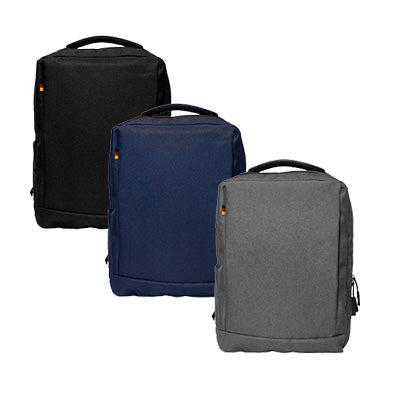
The Oxford Cloth Laptop Backpack listing specifies Oxford cloth, two compartments with a laptop compartment, and overall dimensions of 30 × 13 × 41 cm. These are useful starting details, but they do not confirm the internal laptop-pocket size or compatibility with your team's devices. Request those details and assess a sample before approving a bulk order.
4. Check comfort and organisation with a realistic load
Pack the sample with the items staff actually carry. Ask users to adjust the straps, use the handles and open the compartments. Check whether chargers and documents are easy to reach without removing the laptop, and whether the bag becomes bulky when full.
- Inspect stitching, handles, strap attachment points and zip operation.
- Check that small accessories can be organised without pressing against the device.
- If a bottle pocket is required, test it with the intended bottle and check its position relative to electronics.
- For business travel, confirm any luggage attachment against the intended suitcase handle.
- Ask for care instructions, warranty terms and how defects or replacements would be handled.
If the listing uses terms such as water-resistant, anti-theft or recycled, ask what feature or component the description covers. Do not interpret water resistance as waterproof protection or an anti-theft feature as a guarantee against theft. For environmental purchasing criteria, use our material claims and supplier evidence guide.
5. Confirm where and how the logo can be added
Send the artwork and desired placement with the product enquiry. Ask the supplier to confirm a suitable decoration method for the exact bag material and construction. Seams, pockets, padding and existing brand marks can limit the available area.
Request a proof showing the logo size and position. Ask whether a decorated sample is available when finish or colour matching is important. Agree artwork approval before production and check whether individual names change the cost or schedule.
Adding a logo to a stocked bag is different from changing its dimensions, compartments or straps. If you need a custom-built bag, specify that separately and request confirmation of feasibility, minimum quantity, sampling cost and timing.
6. Compare the full order cost and delivery plan
Compare quotations for the same model, quantity, decoration, packing and delivery requirements. Include applicable taxes, samples, artwork or setup costs and any personalisation. Set an all-in allowance per recipient so the shortlist reflects the complete programme cost.
For onboarding, separate confirmed hires from forecast demand. Ask whether the selected bag can be reordered and what may change between batches; future stock, colours and pricing need reconfirmation. If the order is for existing staff, collect format preferences before finalising quantities.
Give both the handover date and the earlier receiving date. Confirm time for samples, artwork approval, production, packing and delivery. Specify office quantities or individual-dispatch requirements and ask the supplier to confirm the available service and charges.
Send this brief for a work-bag quotation
- Employee count and expected follow-up batches.
- Laptop models, external dimensions and any protective cases.
- Daily contents and preferred format: backpack, laptop bag or sleeve.
- Product links, preferred colours and all-in budget per recipient.
- Logo artwork, placement and any individual names.
- Required samples, documentation, packaging and allocation labels.
- Receiving date, delivery locations and quantity splits.
Request a quotation from GiftStore so suitable models, device fit, branding and the complete order scope can be checked.
Employee work-bag FAQs
Will every 15.6-inch laptop fit the same bag?
Do not rely on screen size alone. Compare the device's external dimensions with the usable compartment and opening, then test the actual device in a sample.
Should we choose a backpack or a laptop sleeve?
A backpack can carry the wider daily kit. A sleeve may suit staff who already use a main bag. Check the person's routine and test both the device fit and, where relevant, sleeve-to-bag fit.
Can every bag be printed or embroidered?
Methods and available areas depend on the exact material, construction and brand restrictions. Send the artwork with your shortlist and ask for confirmation and a proof.
Is there a standard minimum quantity or lead time?
Both vary by model, availability and decoration. Include your quantity and receiving date so the supplier can confirm workable options.
Can the bag be part of an employee welcome kit?
Yes, it can be considered as a kit component. Use the welcome-kit planning guide to coordinate the contents, packing and handover, and confirm the supplier's quoted scope.

← Older Post Newer Post →