Build a shared welcome-kit core, then choose useful additions for office, hybrid, remote and mobile employees. Includes a worked quantity example for HR buyers.
Employee Welcome Kits: What to Include for Different Roles
Build one shared welcome kit, then add only what each employee’s working day requires. A notebook and suitable bottle can form a shortlist for the core; a laptop bag or other addition should solve a specific need rather than make every box larger.
For HR teams in Singapore, this approach creates a consistent welcome while keeping contents relevant to office, hybrid, remote and mobile roles. The combinations below are planning suggestions, not fixed GiftStore packages or confirmed product inclusions.
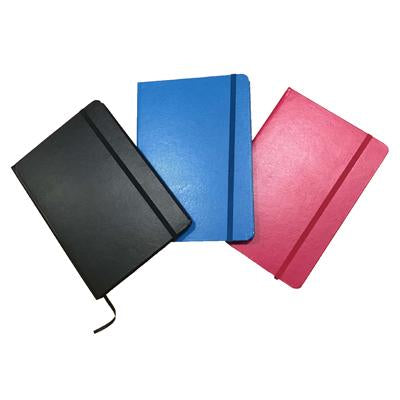
A notebook is one possible core item. This product image does not represent a complete kit, included pen or gift packaging.
Start with three questions for the hiring manager
Where will the employee work most days? An assigned desk, shared workspace, home office and customer site create different needs.
What is already supplied? Confirm the laptop bag, stationery, headset and other equipment provided by IT or the department before adding duplicates.
How will the kit reach them? An office handover and individual delivery may need different packing, labelling and budget allowances.
Keep essential work equipment on the relevant department’s checklist. The welcome gift should complement that equipment, with any electronic accessory checked against the actual device and company requirements.
A welcome-kit shortlist by role
Employee group
Possible contents
Check before approving
Office-based staff
Notebook, suitable bottle, welcome note
Desk space, notebook layout, bottle care and existing supplies
Hybrid staff and commuters
Shared core plus a laptop backpack if needed
Actual device dimensions, carrying comfort and whether IT already supplies a bag
Remote employees
Compact core plus a useful desk item selected around their setup
Available space, existing equipment, packing and delivery arrangements
Mobile or customer-facing teams
Core items that travel well; a suitable work bag where needed
What staff carry, bag capacity, bottle closure and the work environment
Graduates and interns
A consistent core for the intake, with a team-supplied orientation note
Confirmed headcount, start dates and whether department-specific extras are necessary
Use this table to identify a need, then check individual products. A category name alone does not establish device fit, leak resistance, care suitability or what comes in the box.
Office roles: choose items that earn their desk space
For employees with an assigned desk, compare notebooks by size, page layout and cover preference. Check whether a pen is included in the selected product instead of assuming it accompanies every notebook.
A mug may be useful where there is an appropriate washing and storage arrangement. Use our staff mug buying guide to assess materials, logo placement and protective packing. Avoid adding both a mug and a bottle automatically; ask whether the employee will use both.
Hybrid roles: prioritise what travels between workplaces
A laptop backpack can be a relevant addition when staff regularly carry equipment and do not already receive one. Confirm the laptop’s actual dimensions, other daily contents and the bag’s compartment measurements. A screen-size label is a starting point, not a fit check.
Compare the bag with the items it will carry. Check the intended water bottle against its pocket or compartment and ask for model-specific closure guidance before placing it beside equipment. Our employee work-bag guide covers the fuller selection process.
Remote roles: check the setup before adding accessories
A remote employee may already have a preferred desk arrangement. Ask about useful gaps instead of assuming every home worker needs another stand, charger or headset. For any electronic addition, have the responsible team confirm compatibility and required specifications before ordering.
Keep the packed size and protection requirements in the brief. Ask GiftStore to confirm whether individual dispatch is available for the proposed order, together with packing charges and delivery scope. Do not assume a presentation box is also a suitable shipping carton.
Tech teams: separate welcome gifts from IT equipment
For developers, product teams and IT staff, start by checking what the employer already issues. A welcome kit should complement the working setup. Do not use the gift order to choose essential chargers, storage devices or other equipment without the responsible team’s approval.
Prepare a shared core, such as a notebook, suitable bottle and team welcome note, then discuss additions against a specific need:
A laptop bag for commuting: confirm the issued laptop’s actual dimensions, other items carried and whether a bag is already included in the IT allocation.
A desk accessory: check the employee’s workspace and any existing allocation before shortlisting another item.
An electronic accessory: have IT define the required specification and approve the exact proposed model. Include the necessary connections and supplied components in the quotation brief.
Browse employee gadgets and electronics only after the need is defined. If a technical requirement remains unresolved, quote the shared core separately so the approver can assess it while the accessory is being checked.
A practical brief for a small tech intake
Illustrative example: 12 new starters receive the same notebook, bottle and welcome note. IT confirms that all already receive chargers, while four commuting employees need a laptop backpack. Request pricing for 12 core sets and four bags, with branding and packing shown separately. These quantities are an example, not a minimum-order or availability promise.
Keep IT equipment allocation with the responsible department and give the gift supplier only the specifications needed for the merchandise order. Agree who confirms device fit, who approves branding and who checks each kit before handover.
For staff moving between appointments or work locations, shortlist portable items around what they actually carry. Discuss notebook size, bag compartments and bottle capacity with the team lead. A larger item is not necessarily the more useful option.
Keep welcome merchandise separate from any role-specific protective equipment or mandatory workwear. Those requirements should be defined through the employer’s normal purchasing process.
Turn the shortlist into quantities: a worked example
Illustrative planning example: an intake has 30 office-based hires, 15 hybrid hires and 5 remote hires. HR selects a notebook and bottle for all 50 people. The 15 hybrid hires also need a backpack; the other groups already have suitable bags.
Shared core: 50 notebooks and 50 bottles.
Hybrid addition: 15 backpacks.
Welcome notes: 50, with content supplied by the employer.
These figures demonstrate quantity planning, not a minimum-order or price promise. A 15-piece addition may have different branding minimums or setup costs from the 50-piece core. Ask for feasibility by component before approving the combinations.
Record spare quantities separately. If HR chooses to hold extras, state which items are included and where they will be stored. Do not silently count forecast hires as confirmed recipients.
Keep the welcome consistent across different kits
Agree a common standard for the core items, logo treatment and welcome message. Explain additions through practical role needs. For graduate or intern batches, a small, consistent core can simplify handout and replenishment without creating unnecessary product variations.
Give each approved version a simple packing label and a written contents list. If an item becomes unavailable, agree the substitute before packing. Keep names and department assignments current so the correct version reaches each starter.
What to send for an accurate quotation
Send GiftStore:
Number of kits by role and start date.
Shared core items and additions for each group.
Product references, colours and any device-fit requirements.
Budget per kit, stating whether branding, packing, delivery and GST are included.
Logo artwork, required positions and any individual names.
Loose products or assembled kits, with packaging and note requirements.
Required receiving date and number of delivery locations.
Ready to approve the order? Use the HR welcome-kit approval checklist to confirm quantities, artwork, packed samples and receiving arrangements.
Frequently asked questions
Should everyone receive an identical welcome kit?
A shared core provides consistency. Add role-specific items only when there is a clear need, and agree the approach internally before placing the order.
Can different kit versions be ordered together?
Include the quantity and contents of each version in one brief. GiftStore needs to confirm product minimums, branding, assembly and packing requirements for the proposed mix.
Do we need a custom box for every kit?
Decide how the kits will be handed over or delivered first. Ask about suitable packaging and its separate cost; a custom box is not automatically required or included.


← Older Post